





Are you struggling to refresh Angular components without a full page reload? This guide will explain you simple yet effective technique to achieve your purpose for sure.
Step-by-Step Guide to Refresh Angular Components Without Full Page Reload:
If you are working with Angular and need to refresh a component without navigation on another component without using window.location.reload() or location.reload(), you can use the following code in your project:
Step 1: Setting up the Router for Component Refresh
You can simply create your new component or use the existing one, and then add the below code.
Step 2: Subscribing to Router Events
someSubscription: any;
Then, add this code to the required component’s constructor.
this.router.routeReuseStrategy.shouldReuseRoute = function () {
return false;
};
this.someSubscription = this.router.events.subscribe((event) => {
if (event instanceof NavigationEnd) {
// Here is the dashing line comes in the picture.
 // You need to tell the router that, you didn't visit or load the page previously, so mark the navigated flag to false as below.
    this.router.navigated = false;
}
});
Step 3: [Must important] Cleaning up with ngOnDestroy
Make sure to unsubscribe from this someSubscription in ngOnDestroy().
Tip: Always unsubscribe from observables in
ngOnDestroy()to avoid memory leaks.
ngOnDestroy() {
   if (this.someSubscription) {
      this.someSubscription.unsubscribe();
   }
}
Here, we are telling the router to think that the last page it visited was never visited actually; when the button is clicked from component 1, the program will load that same component again (refreshing the component).
Note: The above-given snippet will work in Angular 2+ versions (i.e., 2, 4, 5 to 17 — all the latest versions too). (Updated)
I am also writing on DZone (as a Core Member), This article brought me 200k+ views (In just 4 months), How amazing it is! [Sharing some good achievements with you.]
“Refresh an Angular Component without reloading the same Component.”
(I removed my article from DZone as I found many people were copy-pasting it to their website, without credits or attributions.)
Edit: Query from developers,
Hi, please, can you approach update a component from when change a select from another component? Thanks!
Let me explain more for your better understanding. Just imagine the case as shown below, you have two components, and from component 2, You put one button and on-click event, it should refresh your component 1.
Or imagine you have a Header logo, and you want to reload the whole dashboard with a click of the Logo on the top. Directly, you can’t do it — Right?
You can call this.ngOnInit() method, But it’s not good practice in IT Industry! So in this case, You need to trick your router, and it will work 100%.
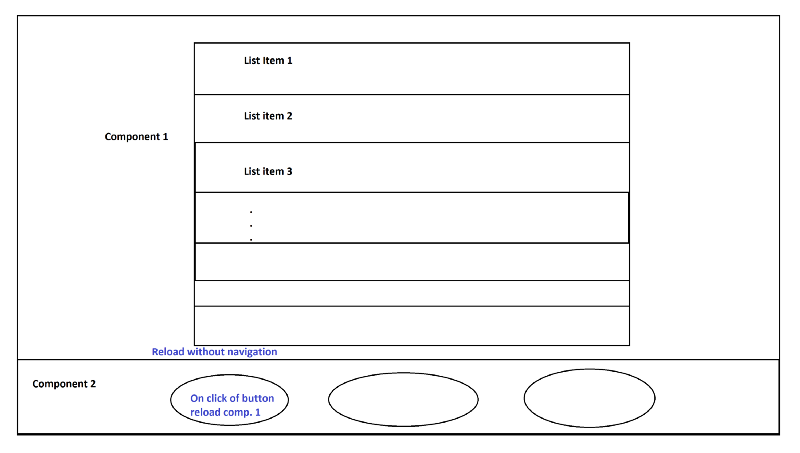 Refresh components in Angular | Trick the router
Image by the author prepared on MS Paint
Share your thoughts on this if you find an alternative for your case.
“By sharing knowledge, it will always increase” — The Rax
Have you tried this method in your Angular projects? Share your experiences or any alternative solutions in the comments below.
FAQ: Refresh Angular Component Without Page Reload
You can refresh an Angular component by configuring the router to not reuse the route and subscribing to router events in the component's constructor.
Yes, this method works for Angular 2 and all later versions, including the latest Angular versions.
To refresh an Angular component without reloading the whole page, you can use the Angular router. By subscribing to router events and overriding the route reuse strategy, you can trick Angular into thinking the component hasn't been visited before. You can also use ngOnDestroy() to clean up any subscriptions to prevent memory leaks.
router.navigated = false in refreshing an Angular component?Setting this.router.navigated = false tells the Angular router that the component hasn’t been visited before, effectively allowing the component to reload without a full page refresh. This is part of the trick to refresh the component when it is triggered by an event like a button click.
ngOnDestroy() when refreshing a component?Unsubscribing from observables in ngOnDestroy() is essential to avoid memory leaks in Angular applications. If you don't unsubscribe, the subscription will persist even after the component is destroyed, consuming resources and potentially causing performance issues.
this.ngOnInit()?While it's possible to call this.ngOnInit() to refresh a component, it is not considered a best practice. Instead, it's better to use Angular’s router events and strategy to ensure a proper refresh without resorting to calling lifecycle methods manually, which can lead to unintended side effects.
To refresh a component from another component, you can use Angular’s router events to listen for changes and reinitialize the component. You could trigger a refresh by using a button click in one component that uses the router trick to reload the other component. This method avoids the need for a full page reload and keeps the user experience smooth.
More FAQ questions (Edited on 16-Dec-2025)
1. Can this method trigger change detection?
Ofcourse yes! This approach works with Angular’s built-in change detection mechanism. The best part is that when the component is reloaded through routing or state updates, Angular automatically runs change detection and updates the view accordingly.
2. Is this approach compatible with the latest Angular versions?
Yes, it is fully compatible with the latest/recent releases. This approach relies on core Angular features such as the Router and Component lifecycle hooks concepts, which are stable and well supported overall.
3. Why should I avoid window.location.reload() in Angular applications?
If you are using window.location.reload() , then it will reload the entire page, which will destroy application state and, in the end, it will lead to poor performance.
Angular provides better ways to refresh components without breaking the single-page application experience.
4. Does reloading a component using the router affect performance?
No, when you are reloading a single component is far more efficient than reloading the whole page. It limits re-rendering to only what is necessary and so keeps the rest of the app unbroken.
5. Will this approach re-execute API calls inside the component?
Yeah, if your API calls are placed inside lifecycle hooks like ngOnInit , they will run again when the component reloads — it's part of the Angular framework. This can be useful when you need fresh data, but you should cache data if repeated calls are unnecessary.
Free advice — For the landing page, never use real-time database calls; cached data is only advisable!
6. Can this technique be used in lazy-loaded modules?
Yes, it can be used smoothly!
The same concept works with lazy-loaded modules. Here, you need to make sure that your routing configurations are correct and the component reload logic is applied within the module’s routing setup. After that, the same approach will work for you!!!
7. Is this method safe for production applications?
Absolutely Yes. This is a production-safe approach, and it is recommended by Angular that keeps your app predictable, testable, and easy to maintain.
Discover more from 9Mood
Subscribe to get the latest posts sent to your email.





What I needed when I searched for this was
runGuardsAndResolvers: ‘always’
in the route declaration.
Try invoking the ngOnInit() again… it should work
hi sir. When ngOnInit is re-invoked then array is getting cleared. I checked this already this morning. But I should not be doing so I think.
But this article helped me a lot